Event storming workshop
A long-form, collaborative design workshop for mapping business events end-to-end — engineers, customers and subject-matter experts co-create a shared model that drives technical design without losing sight of customer value.
Recommended owner: The person driving technical design for the current product increment — architect, tech lead or senior engineer — co-facilitated by the product owner.
Goals
What the team will do during the workshop:
- Pick a single user journey and break it into use cases.
- Map every event (past-tense fact) the system records for that use case.
- Capture open questions as hotspots so they don’t get lost.
- Layer commands (triggers) and state (persisted data) on top of the events.
- Agree on a ubiquitous language everyone will use throughout design, docs and code.
Impact
What the team will walk away with:
- A visual event map per user journey, with events, commands and state clearly linked.
- A written inventory of hotspots — open questions to resolve in later design sessions.
- A ubiquitous-language dictionary that tracks through to domain modeling, context mapping and code.
- A team that has learned the business together, in the same room, in half a day.
When to run event storming
Event storming is the canonical Blueprinting activity on the playbook’s subway map. It’s the backbone of 2.3 Strategic event storming, and a variant appears again as 3.4 Tactical event storming when the team is ready to layer technical design onto the business events.
Alberto Brandolini — the originator of event storming — describes three levels of depth: Big Picture (whole-product scope, wide audience, high-level flow), Process Modeling (mid-scope, drill into a specific process) and Software Design (narrow scope, technical artifacts like aggregates and commands layered on). This workshop operationalizes the Big-Picture and Process-Modeling levels; chapter 3.4 Tactical event storming is where the Software Design level lives. Naming which level you’re at keeps scope, pace, duration and audience calibrated.
Outside of that canonical flow, reach for event storming whenever you need a shared picture of a business process:
- At the start of a new product increment — before committing to technical design, map the business events so the team, customer and SMEs agree on what actually happens.
- When joining an existing team or product — event storming accelerates onboarding by giving new team members a whole-system view in one session.
- When the team can’t agree on scope — a muddled feature usually turns out to be three different event flows talked about interchangeably. Event storming separates them.
- When design sessions keep producing rework — a symptom of business ambiguity that event storming resolves by forcing the group to agree on events before anyone codes.
Don’t reach for event storming when the problem has already happened (that’s a retrospective or 5 Whys), when the scope is a single well-understood technical task (overkill) or when you can’t get the right people in the room. Event storming is only effective with subject-matter experts present — without them, you’ll generate plausible-looking events that aren’t actually what the business does.
Audience and personas
Facilitator
Architect, tech lead or senior engineer with experience running discovery workshops. Event storming demands firm facilitation — conversations spiral quickly, and the facilitator’s job is to keep the team on a single use case long enough to reach useful depth.
Required participants
- Subject-matter experts (SMEs). Business domain experts, operations folks and anyone who knows how the business actually works day-to-day. Without SMEs you’re guessing.
- Product manager or equivalent business-side decision-maker.
- Engineering team — 3–5 engineers, including whoever will lead architecture and implementation.
- Customer representation when the product serves external customers. A real customer is ideal; a customer proxy (UX researcher, customer success lead) is acceptable.
Optional but valuable
- UX / design lead — surface customer-experience events the engineering team might miss.
- Compliance / legal for regulated domains (finance, healthcare) — some events have legal implications that shape design.
Roles
| Role | Responsibility |
|---|---|
| Facilitator | Runs the workshop, enforces rules, keeps the team on one use case at a time. |
| Time-keeper | Watches the clock; signals transitions between steps and sessions. |
| Scribe | Photographs the wall at the end of each step; captures hotspots and ubiquitous-language terms in a shared doc. |
| Language keeper | Tracks new terms as they emerge and pushes back on jargon that isn’t in the ubiquitous language. |
| Participants | Every other attendee. Everyone writes stickies; nobody just watches. |
The three artifacts
Every event map is built from three canonical kinds of stickies. Introduce them up front and keep a visible mini-legend on the wall throughout the workshop.
Hotspot cards
Pink cards — hotspots — are a fourth color you’ll see on every mature event map. Unlike the three canonical artifacts above, hotspots aren’t part of the business domain; they’re a facilitation technique for capturing unresolved questions. An event map without hotspots is a red flag — it usually means the team is pretending it knows more than it does.
Keep a visible mini-legend on the wall throughout the workshop with all four colors shown together:
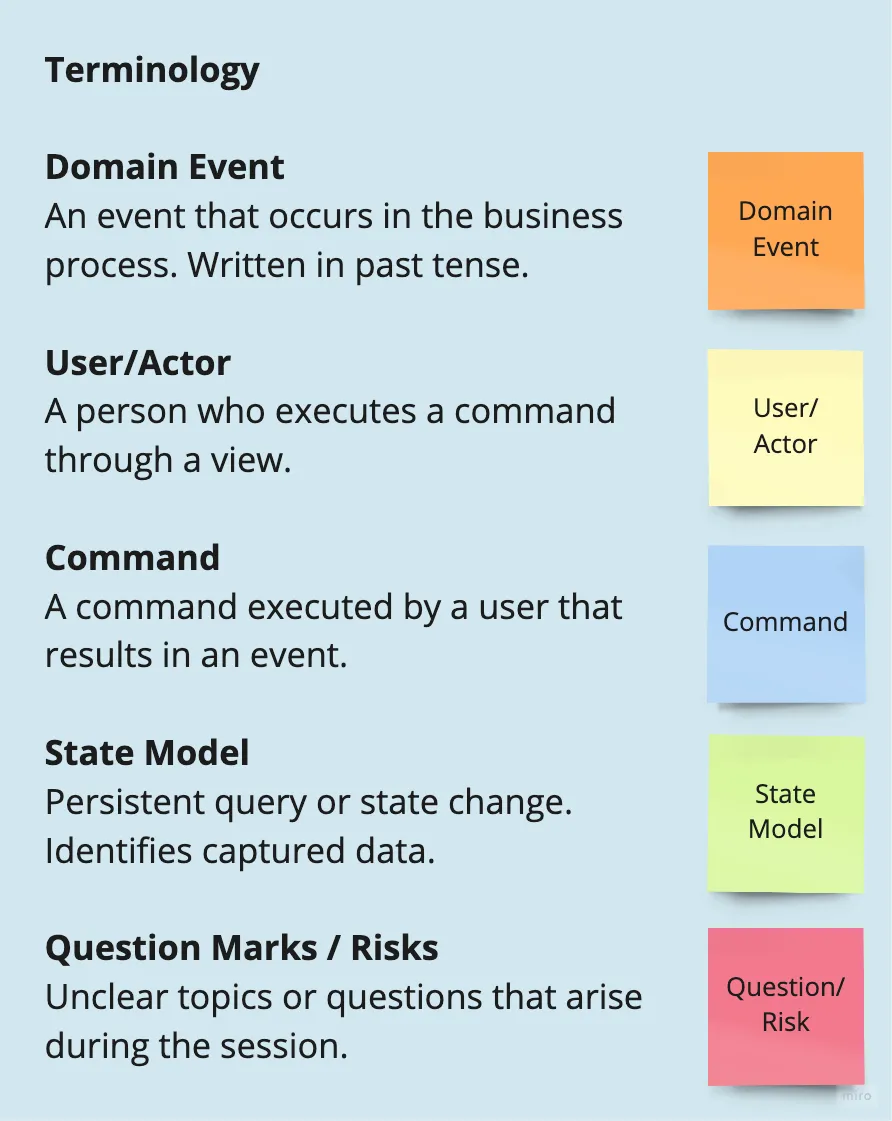
For integration-heavy flows, some teams add a fifth color (often purple) for external-system events — events triggered by systems outside the team’s control. Strictly optional; useful when the map needs to show where the team’s system ends and vendors, partners or upstream services begin.
Pre-homework
Reading (for all participants)
- 2.3 Strategic event storming — the playbook chapter this workshop operationalizes.
- My formula for running a successful workshop — the meta-framework this guide follows.
- Do you understand your customer? — the ubiquitous-language primer.
- Alberto Brandolini, Remote Event Storming (required if the workshop is virtual).
Individual prep (~15 min)
Each participant arrives with:
- One candidate user journey they’d like the workshop to cover (written in one sentence, in customer language).
- A short list of words they use that they suspect mean different things to different people (fuel for the ubiquitous-language dictionary).
Team prep (done by facilitator, ~45 min)
- Decide scope: which single use case (or small set of related use cases) the workshop will tackle. Don’t boil the ocean. One clean use case per half-day is a strong default.
- Pre-stage the wall or virtual board with the mini-legend (event, command, state and hotspot) clearly visible.
- Prepare a first draft of the ubiquitous language dictionary — 10 or so terms the team already uses for the domain. The workshop will extend it.
- Confirm all required SMEs have accepted the invite. If a critical SME can’t attend, reschedule. Half-finished event maps are worse than no event map.
Materials and setup
- In person: A long wall or two (event maps get wide), sticky notes in four colors (orange, blue, green and pink), non-permanent markers, painter’s tape and a camera for photographing the wall.
- Virtual: A digital whiteboard — Miro is the default, with an excellent event-storming template ready to go. Pre-populate the legend, ubiquitous-language dictionary and user-journey headers.
- Mini-legend printed or posted prominently.
- Shared doc for capturing hotspots and ubiquitous-language terms as they emerge.
Agenda (half-day — 4 hours including breaks)
| Time | Segment | Leader |
|---|---|---|
| 0:00–0:15 | Welcome, workshop framing, introduce the legend | Facilitator |
| 0:15–0:25 | Practice round (optional for new teams) | Facilitator |
| 0:25–1:10 | Exercise 1 — Identify core events | Team |
| 1:10–1:20 | Break | — |
| 1:20–1:50 | Exercise 2 — Capture hotspots | Team |
| 1:50–2:30 | Exercise 3 — Add commands and state | Team |
| 2:30–3:00 | Lunch / long break | — |
| 3:00–3:30 | Exercise 4 — Review, refine, connect flows | Team |
| 3:30–3:50 | Ubiquitous language consolidation | Language keeper |
| 3:50–4:00 | Close — hotspot triage, photograph the wall | Facilitator |
For teams new to event storming, consider a two-day format: one day for Exercises 1–2, a break of 24–48 hours for SMEs to research hotspots, then a second day for Exercises 3–4.
Workshop exercises
Practice round (10 min, optional)
If the team has never run event storming, open with a practice round on a topic outside the business domain — ordering food at a restaurant, booking a flight or posting on social media. The goal is to get the mechanics right (past-tense events, one sticky per event, don’t jump to commands yet) on a topic where the stakes are zero.
Keep the practice round strictly out of the business. If it drifts toward real work, redirect firmly — the point is to practice the motion, not to start the actual storm.
Exercise 1 — Identify core events (45 min)
The workshop proper starts here. Brandolini names this the chaotic exploration phase deliberately — the opening should feel messy, not orderly. The point is to surface everyone’s mental model at once, before any one person’s narrative anchors the group.
The figures below illustrate a working example: Sally (Borrower) buys a new bike from Peloton (Merchant) and chooses to pay using installments. MyBank receives Sally’s loan application, approves the purchase and pays Peloton.
Setup (5 min)
Write the user journey across the top of the wall. Underneath, draw a horizontal line that represents the flow of time — left to right. Remind the team: events only, past tense and orange stickies. No commands, no state, no hotspots yet. Just events.
Chaotic exploration (20 min)
Every participant writes events on orange stickies and places them on the wall — simultaneously, without waiting for order. The facilitator reminds the team of the rules and resists putting anything on the wall themselves; the moderator’s job is to redirect, not to participate.
- Events go on the timeline roughly left-to-right in the order they happen, but don’t enforce ordering yet — let the wall get messy. Messy is the whole point of this phase.
- If someone writes a command (“Apply for loan”) redirect them: “That’s a trigger — what event resulted?” Usually it’s “Loan application received.”
- If someone gets blocked, ask, “What happens next? What event gets recorded?”
The facilitator watches for:
- Tense drift. Stickies that slip into future or present tense get rewritten. The past tense is the discipline.
- Silence. If an engineer isn’t contributing, ask them directly what events they think the system should record for their area.
- Expansion beyond scope. If the team drifts into a different use case, note it on the side and redirect back. The other use case gets its own session.
Enforce the timeline (20 min)
With chaotic exploration done, the team now sorts stickies left-to-right by the order in which events occur. Cluster closely related events vertically. Duplicates and near-duplicates get merged. This is where the mess becomes a map.
Expected output: 15–40 orange stickies for a non-trivial use case, arranged chronologically, with rough vertical clustering where events belong together.
Exercise 2 — Capture hotspots (30 min)
Ask the team: Where are the gaps? What do we not know?
Questions surface that nobody can answer. Those are hotspots. Write them on pink stickies and place them adjacent to the events they relate to. Examples from a banking use case:
- “What happens if the customer has insufficient funds?”
- “Does underwriting apply for customers under 21?”
- “Who owns the fraud-check SLA?”
- “Do we need customer consent before pulling credit?”
Don’t try to answer hotspots on the spot. That’s the whole point — they get parked so the workshop keeps moving. Research and follow-up happens between sessions.
If an SME can answer a hotspot cheaply and on the spot, great — write the answer on a green sticky underneath the pink one and move on. But don’t let the workshop devolve into a Q&A session; that kills momentum.
Expected output: 5–15 pink stickies surfacing real unknowns, each placed next to the event it affects.
Exercise 3 — Add commands and state (40 min)
Now that the events are stable, layer in how they happen.
Commands (20 min)
For each event, ask: What caused this event? Write the trigger on a blue command sticky and place it immediately before the event on the timeline. Most events have exactly one command; some have multiple (for example, “Loan application received” might be triggered by either a web-form submission or an API call).
Watch for:
- Missing commands. If an event has no cause the team can identify, that’s a hotspot — add a pink sticky asking “what triggers this?”
- Compound commands. “Customer applied for loan and verified identity” is two commands. Split them.
- Commands without events. Rare but possible — usually means the command doesn’t produce a lasting outcome (a query, a log action). If it’s business-significant, it should produce an event. If it isn’t, leave it off the map.
State (20 min)
For each command, ask: What information was recorded as a consequence? Write data stores on green state stickies. Place them under the command that modifies them.
State cards appear under commands, not events. A command like “Save loan application” writes to a “Loan applications” state store; the event “Loan application received” is the fact that this happened.
Watch for:
- Data without an owning command. If you see a state store that nothing writes to, that’s either missing coverage or a read-only reference (pull it from another context).
- Multiple commands writing to the same state. Normal. Connect them with thin lines if helpful.
Expected output: Every event has at least one command upstream; every command that modifies data has a state store attached.
Exercise 4 — Review, refine, connect flows (30 min)
Step back from the wall. Walk the entire flow left-to-right as a group and narrate the story:
“Sally submits a loan application. That triggers ‘Save loan application,’ which writes to the Loan applications store and emits ‘Loan application received.’ Underwriting picks that up and triggers ‘Run credit check,’ which writes to Credit reports and emits ‘Credit check completed…’”
As you narrate, the team listens for:
- Missing steps. Events that should logically exist but don’t.
- Out-of-order stickies. Sequencing errors the map didn’t catch.
- Ambiguous language. Terms that the speaker interprets differently from the SMEs. Each one goes into the ubiquitous-language dictionary.
- New hotspots. Reading the flow aloud surfaces questions the silent review missed.
If the workshop is covering multiple related use cases, use this step to connect them — where does Use Case A end and Use Case B begin? Place connection arrows between the maps.
Ubiquitous language consolidation (20 min)
The language keeper reads the consolidated dictionary aloud. For each term:
- Does the team agree on the definition?
- Does it match what SMEs actually say?
- Is it distinct from other terms, or is it a synonym for something we already named?
The goal is a dictionary that everyone — business, engineering, design, operations — will use consistently in design docs, code, tests and conversations.
Expected output: A living ubiquitous-language dictionary with 20–50 terms, each with a one-line definition in the customer’s language.
Protecting workshop value
Event storming has a few guardrails that, if skipped, quietly unravel the output:
- All the right parties present. If a critical SME doesn’t show up, reschedule. An event map missing their input is an event map with unknown blind spots. Reschedule is cheaper than the rework that follows from an incomplete map.
- Ubiquitous language discipline. The language keeper’s job isn’t ceremonial. Every time the team drifts into technical jargon (“shard,” “queue,” “microservice”), stop and translate. The customer and SMEs need to be able to read the map.
- Every participant contributes. The facilitator’s “I don’t put anything on the wall” rule matters. When someone makes a suggestion, the response is “Great idea — go write it and put it up.” This converts passive observers into active participants and is the single biggest lever for workshop effectiveness.
- Stop when done for today, not when out of time. A rushed event map is worse than an incomplete one. If the team hasn’t finished a use case by the end of the day, book another session — don’t compress.
Capturing results
Within 24 hours, the scribe produces:
- Photos of the wall — or export of the Miro board. Event maps evolve; keep the baseline from each session.
- Hotspot list — every pink sticky, with owner and a date by which the question needs resolution.
- Ubiquitous-language dictionary — the consolidated list, in a shared doc that the team will extend.
- Next-session agenda — which use cases are next, any follow-up research needed to unblock the current map.
The event maps are living design documents. Expect them to evolve through the rest of the Blueprinting phase, into 2.4 Domain modeling and 2.5 Context mapping, and again during 3.4 Tactical event storming when commands and aggregates get layered on.
Follow-up
- Hotspot closure. Each pink sticky’s owner researches and brings back the answer. Update the map; update the dictionary.
- Next sessions. Event storming is not a one-shot workshop. Teams typically run three to five sessions over the life of a product increment — one per user journey or as needed to cover new scope.
- Feed the next activities. The event maps are the direct input into domain modeling and context mapping. The ubiquitous-language dictionary is the backbone of every artifact that follows, including code.
- Keep the wall up. Physical or virtual — leave the event map somewhere the team can see it. It becomes a reference during design sessions, standups, PR reviews and retros.
Anti-patterns to watch for
- The facilitator keeps writing on the wall. Turns the workshop into a presentation. The facilitator should write nothing except the legend and headers. Participants do the work.
- Present or future tense events. “Customer buys bike.” The past-tense discipline is load-bearing — without it, you’re designing, not discovering. Redirect: “Rewrite that as ‘Bike purchased’ or ‘Purchase completed.’”
- Skipping hotspots because they slow things down. A hotspot ignored is a design gap you’ll pay for in implementation rework. Capture them; don’t try to solve them mid-storm.
- Going too wide on scope. One use case per half-day. Teams that try to map a whole product in one session end up with a shallow map that doesn’t hold up to technical design.
- Subject-matter experts silent. If the SMEs aren’t talking, the engineers are guessing. Draw them out: “In your experience, what happens when…?” If an SME is consistently quiet, take a break and check in privately.
- Technology creeping into the map. “Save loan application to Postgres.” Technology belongs in 3.4 Tactical event storming, not here. Redirect: “For now, just the business event — we’ll pick the technology later.”
Alternative and complementary exercises
Swap these in when the standard agenda doesn’t fit, when the scope is narrower or when the team has bandwidth only for a short session.
Focused event storm on iteration decisions (45 min)
A compressed variant used inside the planning workshop to map the decisions made during one iteration rather than the business events of a product feature. Same color scheme, smaller scope, focused on when decisions happened versus when they could have happened.
Use it as: A 45-minute exercise inside a larger retrospective workshop, when the goal is finding decision-timing waste rather than designing a product.
Tactical event storming (4–8 hours)
The natural follow-on covered in 3.4 Tactical event storming. Same technique, extended to layer aggregates (business-logic clusters), queries (information gathering) and technical annotations onto the event map. Engineering-heavy; customer and SME involvement drops.
Use it as: The next-phase workshop after the strategic event storm is stable and the team is ready to commit to technical design.
Example mapping (15–30 min per story)
Matt Wynne’s short-form alternative for individual story definition rather than full-journey discovery. Produces acceptance criteria (green), rules (blue) and questions (red) for a story in one focused session.
Use it as: A lighter-weight substitute when the scope is a single user story ready for iteration planning rather than a product-level journey. Full walkthrough → Example mapping.
Journey mapping (30–45 min)
When the team needs the customer’s experience perspective rather than the system’s event perspective, journey mapping walks a single persona through their interaction end-to-end. Complementary to event storming — journey maps show what the customer feels; event storming shows what the business records.
Use it as: A companion exercise run before or after event storming, especially useful for UX-heavy features. Full walkthrough → Journey mapping.
1-2-4-All for silent phases
For the silent event-generation phase of Exercise 1, the 1-2-4-All facilitation pattern prevents dominant voices from anchoring the discussion in mixed-seniority or remote-heavy groups. Apply to the sticky-generation phase specifically — not to the whole workshop.
References
Related guides
- Planning workshop — the compressed variant used to storm iteration decisions.
- Rework workshop — event storming often surfaces as a preventive follow-on when rework traces to unclear business events.
- Example mapping — single-story alternative when a full journey storm is overkill.
- Journey mapping — customer-experience companion to event storming.
Process guides
- 1-2-4-All — facilitation pattern for the silent event-generation phase.
- Dot voting — convergence technique for prioritizing hotspots.
Delivery Playbook chapters
- 2.3 Strategic event storming — the canonical chapter this workshop operationalizes.
- 2.4 Domain modeling — where event maps become the raw material for bounded contexts.
- 2.5 Context mapping — how the contexts discovered from event maps interconnect.
- 3.4 Tactical event storming — the engineering-layered follow-on.
External references
- Alberto Brandolini (originator), Introducing EventStorming (LeanPub) — the canonical text, still the single best reference.
- Alberto Brandolini, Remote Event Storming (Avanscoperta, 2020) — essential for virtual workshops.
- EventStorming.com — the community site with books, articles and workshop resources.
- Miro, Event Storming template — ready-to-go virtual board.
- Vaughn Vernon, Domain-Driven Design Distilled (Addison-Wesley, 2016) — essential companion for the domain-driven design vocabulary that tactical event storming uses.
- My formula for running a successful workshop — the meta-framework every workshop in the Guides section follows.
Footnotes
-
The playbook uses “state / persisted data” for green stickies; Brandolini’s canonical vocabulary reserves green specifically for read models — the information a decision-maker consults to decide what command to issue next. For strategic event storming the simplification is rarely consequential; for software-design-level work (3.4 Tactical event storming) the distinction matters and is worth reading Brandolini directly. ↩